Most businesses approach SEO by targeting keywords. But without a keyword map, you end up with pages competing against each other, content gaps you don’t notice, and a site structure that confuses both users and search engines.
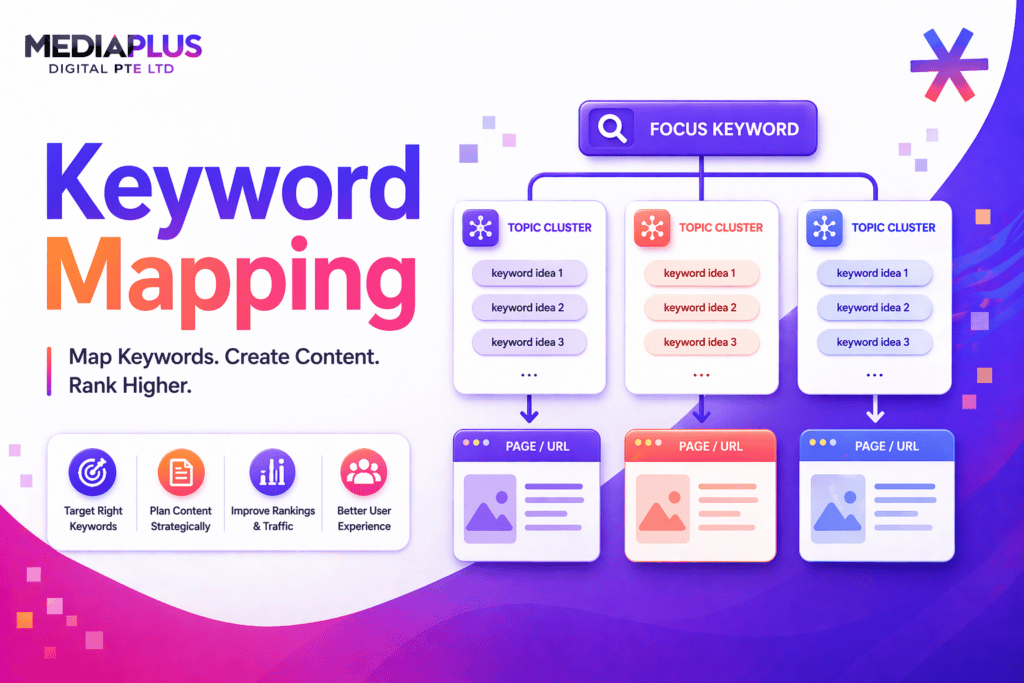
Keyword mapping is the process of assigning specific target keywords to specific pages on your website. It’s the bridge between keyword research and content execution – and it’s one of the most overlooked steps in SEO strategy.
What Is Keyword Mapping?
Keyword mapping is the practice of assigning a primary keyword (and related secondary keywords) to each page on your website. The goal is to ensure every page has a clear search intent, no two pages compete for the same keyword (keyword cannibalization), and gaps in your keyword coverage are identified and filled.
A keyword map is typically a spreadsheet that lists every page on your site alongside its assigned primary keyword, secondary keywords, search volume, search intent, current ranking position, and any notes about content needs.
Why Keyword Mapping Matters
- Prevents keyword cannibalization – When multiple pages target the same keyword, they compete against each other in search results. Google gets confused about which page to rank, and often neither performs well.
- Identifies content gaps – A keyword map reveals high-value keywords that no page on your site currently targets – opportunities you’re leaving to competitors.
- Aligns content with search intent – Different keywords have different intent (informational, commercial, transactional). Mapping ensures each page matches the right intent.
- Guides content creation – Instead of writing blog posts randomly, your content calendar is driven by keyword opportunities identified in the map.
- Improves internal linking – When you know which page targets which keyword, you can build strategic internal links that reinforce topical authority.
How to Create a Keyword Map: Step by Step
Step 1: Audit Your Existing Pages
List every indexable page on your site – homepage, service pages, product pages, blog posts, and landing pages. Use Google Search Console, Screaming Frog, or Ahrefs Site Audit to generate this list. For each page, note: the URL, current title tag, current H1, and any keywords it currently ranks for.
Step 2: Conduct Keyword Research
Build a master list of keywords relevant to your business using tools like Ahrefs, SEMrush, Google Keyword Planner, or Ubersuggest. For each keyword, record: monthly search volume, keyword difficulty, search intent (informational, commercial, transactional, navigational), and CPC (useful for prioritising commercial value).
Step 3: Match Keywords to Pages
Assign one primary keyword per page based on relevance and search intent. A service page should target a transactional keyword (‘web design agency Melbourne’), while a blog post should target an informational keyword (‘what is responsive web design’). Add 2-5 secondary keywords that are semantically related to the primary keyword.
Step 4: Identify Gaps and Opportunities
After mapping existing pages, you’ll find keywords with no matching page. These are your content opportunities. Prioritise by search volume, commercial value, and competition level. Create new pages or blog posts to fill these gaps.
Step 5: Optimise and Monitor
Update title tags, H1s, meta descriptions, and on-page content to align with your keyword assignments. Monitor rankings monthly and adjust the map as search landscapes shift.
Keyword Mapping Template
|
URL |
Page Type |
Primary Keyword |
Search Vol |
Intent |
Secondary Keywords |
Current Rank |
Status |
|
/services/web-design |
Service |
web design agency Australia |
1,200 |
Commercial |
website design, web development |
#8 |
Optimise |
|
/blog/what-is-seo |
Blog |
what is SEO |
8,100 |
Informational |
SEO meaning, search engine optimisation |
#15 |
Update |
|
(new page needed) |
Blog |
keyword mapping |
2,400 |
Informational |
keyword map template, SEO keyword mapping |
N/A |
Create |
Mapping Keywords to Different Page Types
- Homepage – Target your broadest, highest-value brand and service keywords. Example: “digital marketing agency Australia”.
- Service pages – Target commercial-intent keywords specific to each service. Example: “PPC management services” or “landing page design”.
- Blog posts – Target informational keywords that attract top-of-funnel traffic. Example: “what is local SEO” or “how to increase ecommerce sales”.
- Product pages – Target transactional keywords with buying intent. Example: “buy Nike Air Max 90 Australia”.
- Location pages – Target geo-modified keywords for local SEO. Example: “web design agency Melbourne” or “SEO services Sydney”.
How to Prevent Keyword Cannibalization
Keyword cannibalization happens when multiple pages target the same keyword. Signs include:
- Two or more pages ranking for the same keyword, with positions fluctuating
- Neither page ranking as well as you’d expect for that keyword
- Google alternating which page it shows in search results
To fix it: consolidate competing pages into one stronger page (301 redirect the weaker one), differentiate the target keywords so each page has a unique focus, or use canonical tags if the pages serve different purposes but overlap in content.
Tools for Keyword Mapping
- Ahrefs – Site Explorer for current rankings, Keywords Explorer for research, Content Gap tool for competitive analysis.
- SEMrush – Position Tracking, Keyword Magic Tool, and On-Page SEO Checker for mapping and optimisation suggestions.
- Google Search Console – Free. Shows which keywords each page currently ranks for – essential raw data for your keyword map.
- Google Sheets / Excel – Your keyword map itself. Keep it simple, keep it updated.
Final Thoughts
Keyword mapping transforms random SEO efforts into a structured strategy. Every page gets a job, every keyword gets a home, and your entire site works together to build topical authority. It’s the foundation of effective SEO and content marketing.
Need help building a keyword map for your website? Get in touch with MediaPlus Digital Australia for a free SEO consultation.